findMany()
Used to retrieve all rows matching specific conditions.
Available Keys
| Key | Description | Optional | Notes |
|---|---|---|---|
| where | Specifies query conditions | Optional | Retrieves all rows if omitted |
| select | Display settings for columns | Optional | Cannot be used with omit / include. Supports relation field options |
| omit | Exclusion settings for columns | Optional | Cannot be used with select |
| include | Retrieve related records | Optional | Details here |
| orderBy | Sort settings | Optional | Array can be omitted when specifying a single column |
| take | Limit number of records | Optional | Negative values fetch from the end |
| skip | Number of records to skip | Optional | Negative values cause an error |
| distinct | Deduplication settings | Optional | Array can be omitted when specifying a single column |
| cursor | Cursor position | Optional | Cursor-based pagination |
Example Sheet
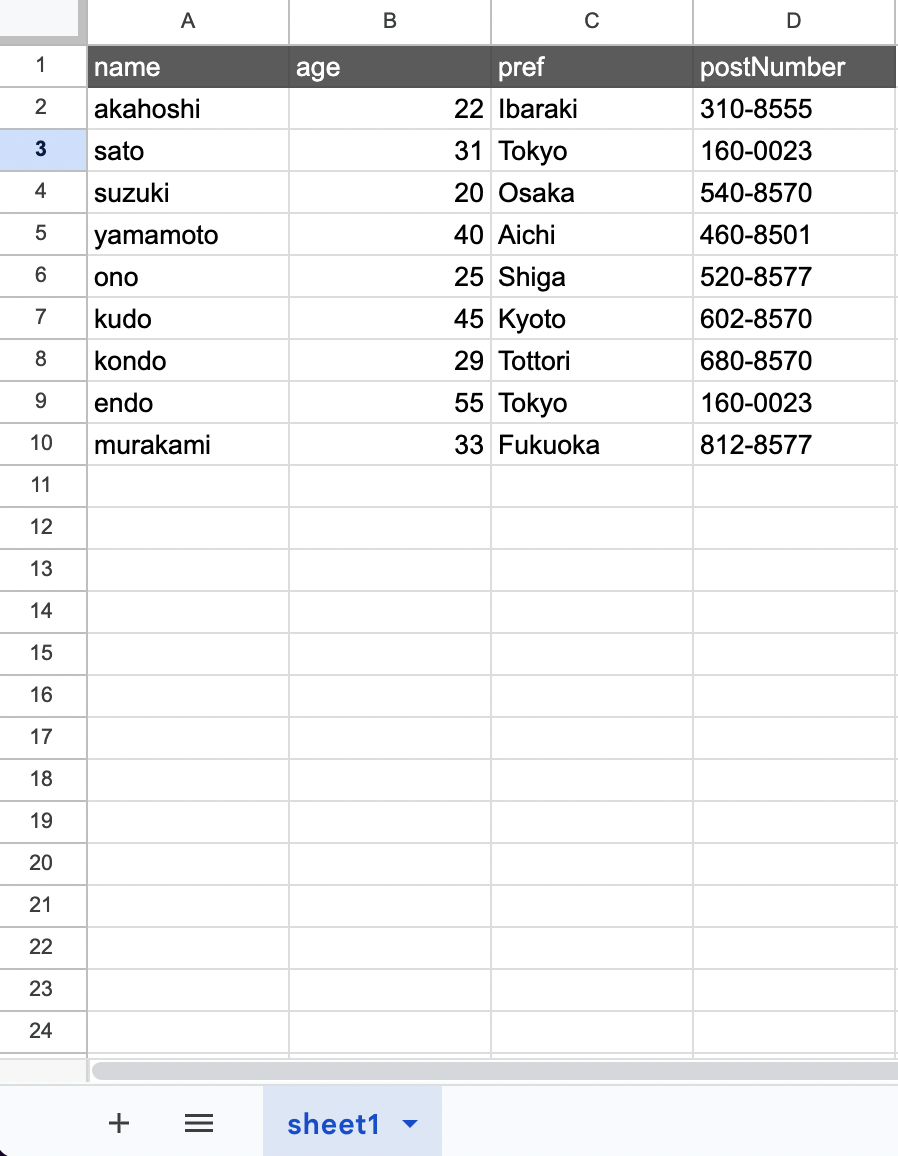
Description
Suppose you want to retrieve rows from the above example with the following condition:
- pref => Tokyo
The code would be:
const gassma = new Gassma.GassmaClient();

// gassma.{{TARGET_SHEET_NAME}}.findMany
const result = gassma.sheet1.findMany({
  where: {
    pref: "Tokyo",
  },
});
The return value has the following format:
[
  { name: "sato", age: 31, pref: "Tokyo", postNumber: "160-0023" },
  { name: "endo", age: 55, pref: "Tokyo", postNumber: "160-0023" },
];
To specify multiple conditions:
const gassma = new Gassma.GassmaClient();

// gassma.{{TARGET_SHEET_NAME}}.findMany
const result = gassma.sheet1.findMany({
  where: {
    pref: "Tokyo",
    年齢: 31,
  },
});
Operators and Partial Matching
Conditional searches using greater than/less than and partial matching are also possible. For example, to retrieve rows with the following conditions:
- age => 20 or older
- age => 30 or younger
The code would be:
const gassma = new Gassma.GassmaClient();

// gassma.{{TARGET_SHEET_NAME}}.findMany
const result = gassma.sheet1.findMany({
  where: {
    age: {
      gte: 20,
      lte: 30,
    },
  },
});
The keys related to conditional searches are as follows:
| Key | Description | Example |
|---|---|---|
| equals | Equal to | equals: 20 |
| not | Not equal to | not: 20 |
| in | Contained in the specified list | in: [20, 21, 22] |
| notIn | Not contained in the specified list | notIn: [23, 24, 25] |
| lt | Less than | lt: 30 |
| lte | Less than or equal to | lte: 30 |
| gt | Greater than | gt: 20 |
| gte | Greater than or equal to | gte: 20 |
| contains | Whether the target data contains the specified string | contains: "AB" |
| startsWith | Whether the target data starts with the specified string | startsWith: "AB" |
| endsWith | Whether the target data ends with the specified string | endsWith: "YZ" |
| mode | Case sensitivity settings | mode: "insensitive" |
In addition to fixed values, you can use the fields property to specify a value from another column in the same row. For details, see the fields reference.
mode: "insensitive"
By specifying mode: "insensitive" with equals, not, contains, startsWith, or endsWith, you can compare without case sensitivity.
const gassma = new Gassma.GassmaClient();

// Matches "alice", "Alice", "ALICE", etc.
const result = gassma.sheet1.findMany({
  where: {
    name: {
      equals: "alice",
      mode: "insensitive",
    },
  },
});
It can also be used with contains, startsWith, and endsWith:
// Matches "Hello World", "HELLO WORLD", etc.
const result = gassma.sheet1.findMany({
  where: {
    title: {
      contains: "hello",
      mode: "insensitive",
    },
  },
});
If mode is not specified or set to the default mode: "default", case is distinguished.
AND, OR, NOT
Searches with multiple conditions are also possible.
AND
For example, to retrieve rows with the following conditions:
- age => 22
- pref => Ibaraki
Using AND:
const gassma = new Gassma.GassmaClient();

// gassma.{{TARGET_SHEET_NAME}}.findMany
const result = gassma.sheet1.findMany({
  where: {
    AND: [
      {
        age: 22,
      },
      {
        pref: "Ibaraki",
      },
    ],
  },
});
OR
For example, to retrieve rows with the following condition:
- age => 22 or 40
Using OR:
const gassma = new Gassma.GassmaClient();

// gassma.{{TARGET_SHEET_NAME}}.findMany
const result = gassma.sheet1.findMany({
  where: {
    OR: [
      {
        age: 22,
      },
      {
        age: 40,
      },
    ],
  },
});
NOT
For example, to retrieve rows with the following conditions:
- age => not 22
- age => not 40
Using NOT:
const gassma = new Gassma.GassmaClient();

// gassma.{{TARGET_SHEET_NAME}}.findMany
const result = gassma.sheet1.findMany({
  where: {
    NOT: [
      {
        age: 22,
      },
      {
        age: 40,
      },
    ],
  },
});
Nesting AND, OR, NOT
You can nest OR or NOT inside AND, for example. This nesting structure can be infinitely deep as long as the GAS call stack allows.
const gassma = new Gassma.GassmaClient();

// gassma.{{TARGET_SHEET_NAME}}.findMany
const result = gassma.sheet1.findMany({
  where: {
    NOT: {
      AND: [
        {
          name: "akahoshi",
        },
        {
          age: 22,
        },
      ],
    },
  },
});
Relation Filters in where
When relation definitions exist, you can filter using conditions on related records within where (some, every, none, is, isNot).
For details, see the where relation filter reference.
select
You can limit the data returned in the response.
For example, to retrieve only age and pref:
const gassma = new Gassma.GassmaClient();

// gassma.{{TARGET_SHEET_NAME}}.findMany
const result = gassma.sheet1.findMany({
  where: {
    age: {
      gte: 20,
    },
  },
  select: {
    name: true,
    pref: true,
  },
});
The return value would be:
[
  { name: "akahoshi", pref: "Ibaraki" },
  { name: "sato", pref: "Tokyo" },
  { name: "suzuki", pref: "Osaka" },
  { name: "yamamoto", pref: "Aichi" },
  { name: "ono", pref: "Shiga" },
  { name: "kudo", pref: "Kyoto" },
  { name: "kondo", pref: "Tottori" },
  { name: "endo", pref: "Tokyo" },
  { name: "murakami", pref: "Fukuoka" },
];
Relation Options within select
When relation definitions exist, you can specify options similar to include for relation fields within select. Instead of specifying include separately, you can control related data retrieval within select.
const gassma = new Gassma.GassmaClient({
  relations: {
    Users: {
      posts: { type: "oneToMany", to: "Posts", field: "id", reference: "authorId" },
    },
  },
});

const result = gassma.Users.findMany({
  select: {
    id: true,
    name: true,
    posts: {
      select: { id: true, title: true },
      where: { published: true },
      orderBy: { id: "desc" },
    },
    _count: true,
  },
});
The options available for relation fields are the same as include options (select, where, orderBy, include, omit, take, skip).
Deep nesting is also supported:
const result = gassma.Users.findMany({
  select: {
    id: true,
    posts: {
      select: {
        id: true,
        comments: {
          select: { id: true, text: true },
        },
      },
    },
  },
});
Top-level select and include cannot be used simultaneously. If you need related data, specify relation options within select or use include alone.
orderBy
You can sort the retrieved rows.
For example, to sort by age in ascending order:
const gassma = new Gassma.GassmaClient();

// gassma.{{TARGET_SHEET_NAME}}.findMany
const result = gassma.sheet1.findMany({
  where: {
    age: {
      gte: 20,
    },
  },
  orderBy: {
    age: "asc",
  },
});
The available values are:
| Key | Meaning |
|---|---|
| asc | Ascending order |
| desc | Descending order |
Null Value Sort Order Control
You can control the position of null values by specifying the nulls option in object format:
const gassma = new Gassma.GassmaClient();

// Place null values at the end
const result = gassma.sheet1.findMany({
  orderBy: {
    age: { sort: "asc", nulls: "last" },
  },
});
// => [20, 22, 31, 40, 55, null, null]
| nulls value | Behavior |
|---|---|
"first" | Place null values at the beginning |
"last" | Place null values at the end |
When nulls is not specified, null values are placed at the beginning for asc and at the end for desc.
You can also specify multiple sort conditions. For example, to:
- Sort by
agein ascending order - If
agevalues are the same, sort those rows bynamein ascending order
The code would be:
const gassma = new Gassma.GassmaClient();

// gassma.{{TARGET_SHEET_NAME}}.findMany
const result = gassma.sheet1.findMany({
  where: {
    age: {
      gte: 20,
    },
  },
  orderBy: [{ age: "asc" }, { name: "asc" }],
});
*Sort priority follows the order of index numbers (lower index = higher priority).
Sorting by Relation Fields
When relation definitions exist, you can sort by manyToOne / oneToOne relation target fields:
const gassma = new Gassma.GassmaClient({
  relations: {
    Posts: {
      author: {
        type: "manyToOne",
        to: "Users",
        field: "authorId",
        reference: "id",
      },
    },
  },
});

// Sort posts by author name in ascending order
const result = gassma.Posts.findMany({
  orderBy: { author: { name: "asc" } },
});
Records with null FK are placed at the beginning for asc and at the end for desc.
Field sorting is not available for oneToMany / manyToMany relations. RelationOrderByUnsupportedTypeError will be thrown.
Sorting by _count
You can sort by the number of records in oneToMany / manyToMany relations:
// Sort users by number of posts in descending order
const result = gassma.Users.findMany({
  orderBy: { posts: { _count: "desc" } },
});
It can also be combined with scalar sorting:
// Sort by post count descending → then by name ascending for ties
const result = gassma.Users.findMany({
  orderBy: [
    { posts: { _count: "desc" } },
    { name: "asc" },
  ],
});
_count sorting is not available for manyToOne / oneToOne relations. RelationOrderByCountUnsupportedTypeError will be thrown.
take
You can specify the number of records to retrieve. Records are taken from the top of the sheet.
For example, to get the top 2 rows from matching records:
const gassma = new Gassma.GassmaClient();

// gassma.{{TARGET_SHEET_NAME}}.findMany
const result = gassma.sheet1.findMany({
  where: {
    age: {
      gte: 20,
    },
  },
  take: 2,
});
Negative take Values
Specifying a negative value for take retrieves N records from the end:
// Get the last 2 records matching the condition
const result = gassma.sheet1.findMany({
  where: {
    age: { gte: 20 },
  },
  take: -2,
});
When take is negative, the direction of skip is also reversed. skip becomes the number of records to exclude from the end:
// After excluding the last 1 record, get the remaining last 2 records
const result = gassma.sheet1.findMany({
  take: -2,
  skip: 1,
});
skip
You can skip specific rows from the retrieved results.
For example, to skip the first matching row:
const gassma = new Gassma.GassmaClient();

// gassma.{{TARGET_SHEET_NAME}}.findMany
const result = gassma.sheet1.findMany({
  where: {
    age: {
      gte: 20,
    },
  },
  skip: 1,
});
Specifying a negative value for skip throws GassmaSkipNegativeError.
cursor
Enables cursor-based pagination. Specify an object that uniquely identifies a record in cursor to use that record as the starting point:
const gassma = new Gassma.GassmaClient();

// Starting from the record with id: 3, retrieve 5 records
const result = gassma.sheet1.findMany({
  cursor: { id: 3 },
  take: 5,
});
When take is positive, records are retrieved toward the end from the cursor position. When take is negative, records from the beginning up to the cursor position are retrieved:
// Starting from id: 3, retrieve records toward the beginning
const result = gassma.sheet1.findMany({
  cursor: { id: 3 },
  take: -5,
});
Combined with skip, you can skip further from the cursor position:
// Starting from id: 3, skip 1 record and retrieve 5 records
const result = gassma.sheet1.findMany({
  cursor: { id: 3 },
  skip: 1,
  take: 5,
});
If the record specified in cursor is not found, an empty array is returned.
Processing Order
The execution order when cursor is included:
where- FilterorderBy- Sortdistinct- Deduplicationcursor- Slice at cursor positionskip/take- Paginationselect/omit- Field shaping
omit
You can exclude specific columns from the return value. This is the inverse of select.
For example, to exclude postNumber:
const gassma = new Gassma.GassmaClient();

// gassma.{{TARGET_SHEET_NAME}}.findMany
const result = gassma.sheet1.findMany({
  where: {
    pref: "Tokyo",
  },
  omit: {
    postNumber: true,
  },
});
The return value would be:
[
  { name: "sato", age: 31, pref: "Tokyo" },
  { name: "endo", age: 55, pref: "Tokyo" },
];
select and omit cannot be used simultaneously. Specifying both throws GassmaFindSelectOmitConflictError.
When global omit is configured, you can override it with { field: false } in the query's omit. For details, see overriding global omit with query omit.
distinct
Specify column names to remove rows with duplicate values. When duplicates exist, data from the upper row takes priority.
For example, to remove age duplicates:
const gassma = new Gassma.GassmaClient();

// gassma.{{TARGET_SHEET_NAME}}.findMany
const result = gassma.sheet1.findMany({
  where: {
    age: {
      gte: 20,
    },
  },
  distinct: ["age"],
});
include
When relation definitions exist, you can retrieve related data together.
For details, see the include reference.