groupBy()
Use this when you want to group data.
Available Keys
| Key Name | Description | Optional | Notes |
|---|---|---|---|
| where | Specify retrieval conditions | Yes | If omitted, all rows are retrieved |
| orderBy | Sort settings | Yes | If specifying only one column, the array can be omitted |
| take | Set the number of records to retrieve | Yes | |
| skip | Set the number of records to skip | Yes | |
| _avg | Average display settings | Yes | |
| _count | Hit count display settings | Yes | |
| _max | Maximum value display settings | Yes | |
| _min | Minimum value display settings | Yes | |
| _sum | Sum display settings | Yes | |
| by | Specify grouping conditions | No | |
| having | Specify conditions after grouping | Yes | If omitted, all data is retrieved |
In where, you can also use relation filters (some / every / none / is / isNot).
Example Sheet
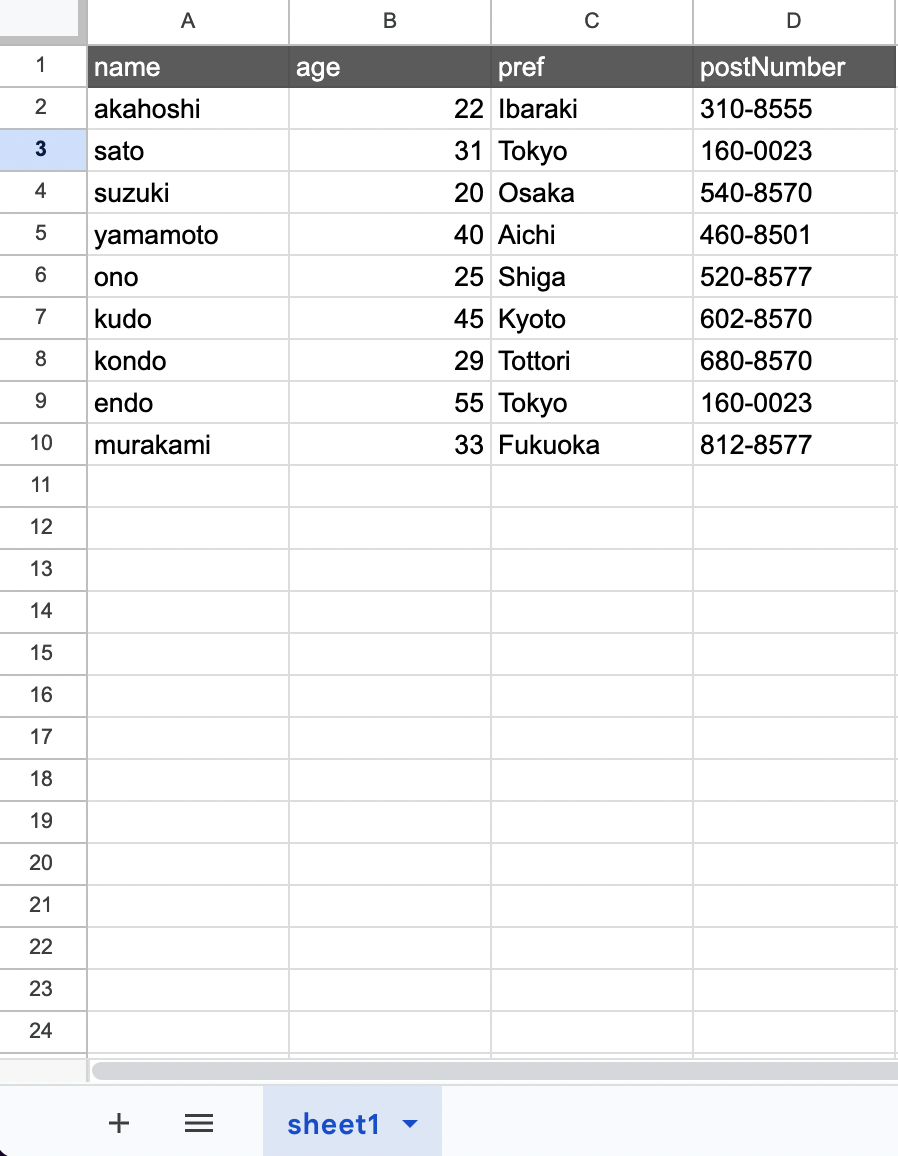
Explanation
Suppose you want to perform the following operation from the example above.
- Group by pref
The code would be as follows.
// gassma.{{TARGET_SHEET_NAME}}.groupBy
const result = gassma.sheet1.groupBy({
  by: "pref",
});
The return value is in the following format.
[
  { pref: "Ibaraki" },
  { pref: "Tokyo" },
  { pref: "Osaka" },
  { pref: "Aichi" },
  { pref: "Shiga" },
  { pref: "Kyoto" },
  { pref: "Tottori" },
  { pref: "Fukuoka" },
];
You can also specify multiple fields. Suppose you want to perform the following operations.
- Group by pref
- Additionally group by age
The code would be as follows.
// gassma.{{TARGET_SHEET_NAME}}.groupBy
const result = gassma.sheet1.groupBy({
  by: ["pref", "age"],
});
The return value is in the following format.
[
  { pref: "Ibaraki", age: 22 },
  { pref: "Tokyo", age: 31 },
  { pref: "Tokyo", age: 55 },
  { pref: "Osaka", age: 20 },
  { pref: "Aichi", age: 40 },
  { pref: "Shiga", age: 25 },
  { pref: "Kyoto", age: 45 },
  { pref: "Tottori", age: 29 },
  { pref: "Fukuoka", age: 33 },
];
having
Use this when you want to extract data that meets specific conditions from grouped data.
For example, suppose you want to extract data with the following conditions.
- Group by pref
- (After grouping) age => average is 30 or less
The code would be as follows.
// gassma.{{TARGET_SHEET_NAME}}.groupBy
const result = gassma.sheet1.groupBy({
  by: ["pref"],
  having: {
    age: {
      _avg: {
        lte: 30,
      },
    },
  },
});
The return value is in the following format.
[
  { pref: "Ibaraki" },
  { pref: "Osaka" },
  { pref: "Shiga" },
  { pref: "Tottori" },
];
AND, OR, NOT in having
You can also use AND, OR, and NOT.
For example, suppose you want to perform the following operation.
- Group by pref
- (After grouping) age => average is NOT 30 or less
The code would be as follows.
// gassma.{{TARGET_SHEET_NAME}}.groupBy
const result = gassma.sheet1.groupBy({
  by: ["pref"],
  having: {
    NOT: {
      age: {
        _avg: {
          lte: 30,
        },
      },
    },
  },
});
The return value would be as follows.
[{ pref: "Tokyo" }, { pref: "Aichi" }, { pref: "Kyoto" }, { pref: "Fukuoka" }];
Also, just like where, you can nest AND inside NOT and create other nested combinations.
Displaying Statistics
You can also display statistics such as averages, just like with aggregate.
For example, suppose you want to perform the following operations.
- Group by pref
- Display the average of age
The code would be as follows.
// gassma.{{TARGET_SHEET_NAME}}.groupBy
const result = gassma.sheet1.groupBy({
  by: ["pref"],
  _avg: { age: true },
});
The return value is in the following format.
[
  { pref: "Ibaraki", _avg: { age: 22 } },
  { pref: "Tokyo", _avg: { age: 43 } },
  { pref: "Osaka", _avg: { age: 20 } },
  { pref: "Aichi", _avg: { age: 40 } },
  { pref: "Shiga", _avg: { age: 25 } },
  { pref: "Kyoto", _avg: { age: 45 } },
  { pref: "Tottori", _avg: { age: 29 } },
  { pref: "Fukuoka", _avg: { age: 33 } },
];