upsert()
Updates a record if it matches the specified conditions, or creates a new one if it doesn't exist. Returns the resulting record.
Available Keys
| Key | Description | Optional | Notes |
|---|---|---|---|
| where | Specifies search conditions | Required | |
| create | Data for creation when not found | Required | |
| update | Data for update when found | Required | |
| select | Display settings for return value columns | Optional | Cannot be used with include |
| omit | Exclusion settings for return value columns | Optional | Cannot be used with select |
| include | Retrieve related records | Optional | Details here |
Example Sheet
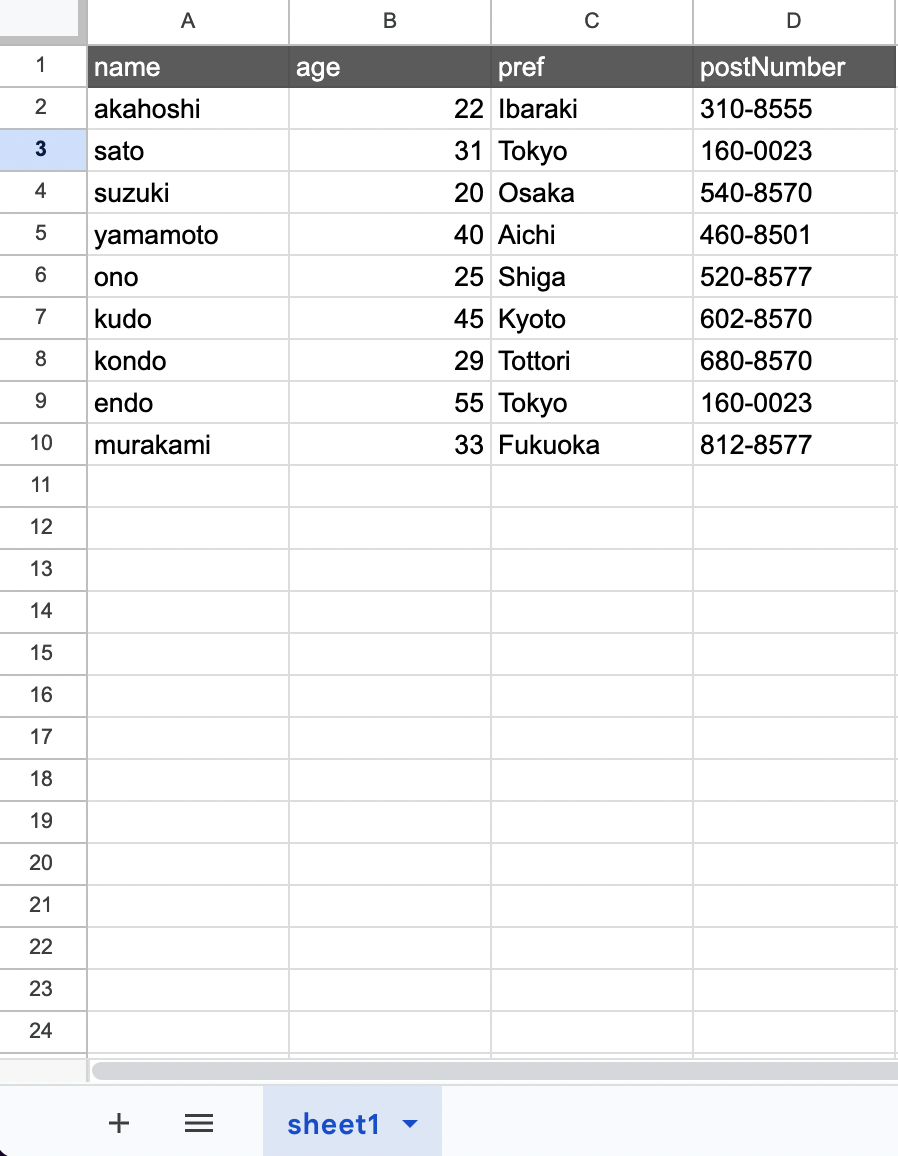
Description
Suppose you want to perform the following operation on the above example:
- Set the age of akahoshi to 23
- Create a new record if it doesn't exist
The code would be:
const gassma = new Gassma.GassmaClient();

// gassma.{{TARGET_SHEET_NAME}}.upsert
const result = gassma.sheet1.upsert({
  where: {
    name: "akahoshi",
  },
  update: {
    age: 23,
  },
  create: {
    name: "akahoshi",
    age: 23,
    pref: "Ibaraki",
    postNumber: "310-8555",
  },
});
When the record exists, the updated record is returned:
{
  name: 'akahoshi',
  age: 23,
  pref: 'Ibaraki',
  postNumber: '310-8555'
}
When the record doesn't exist, it's created with the create data and the created record is returned:
const result = gassma.sheet1.upsert({
  where: { name: "newuser" },
  update: { age: 30 },
  create: {
    name: "newuser",
    age: 30,
    pref: "Tokyo",
    postNumber: "100-0001",
  },
});
// => { name: "newuser", age: 30, pref: "Tokyo", postNumber: "100-0001" }
Nested Write
When relation definitions exist, Nested Write can be used within create / update:
- On
create: Equivalent to create's Nested Write - On
update: Equivalent to update's Nested Write
The where specification follows findMany().